Skip to content
PS5PCEM

Launcher · Windows and Linux

The PS5PCEM launcher

The launcher is where a session starts. It keeps your game library, checks the graphics driver, stores input and display preferences, extracts debug packages and starts game-run with those settings. Windows has a native Win32 interface; Linux has a GTK 3 version with the same pages.

Launcher settings page with language cards, output resolution, preset, toggles and the Vulkan / DirectX 12 graphics API card
Settings in the development build after 0.3.5: twelve interface languages, output resolution, preset, three switches and the graphics API.

Four pages

What each page does

01

Library

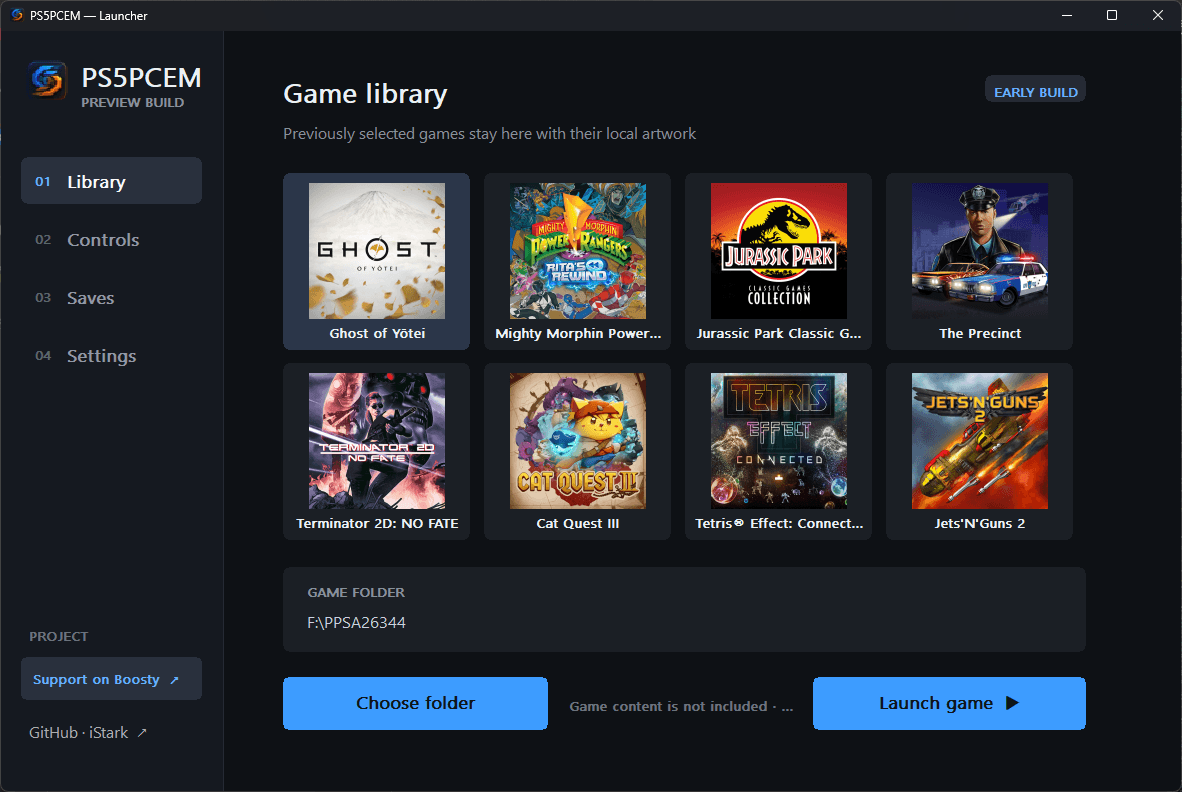
Holds up to 48 games. Each shows its name from sce_sys/param.json and its cover from sce_sys/icon0.png. Switch between grid and table, search by name, title ID or folder, and remove an entry without touching the game files or its saves. Choose folder, Extract PKG and Launch game sit underneath.
02

Controls

Pick Gamepad, Keyboard as DualSense, or both at once. On Windows a DualSense or DualShock 4 is read directly over USB or Bluetooth, and Xbox-compatible pads use XInput slots 1–4. Each DualSense button can be bound to a key; WASD drives the left stick and Alt + arrows the right one. Test runs a second of rumble and a light-bar colour sweep.

03

Saves

Lists every local save slot, grouped by title ID, whichever game is selected, and opens the save folder. Saves live in savedata/<titleId>/<slot>/ in the emulator's home and are shared with direct command-line runs.

04

Settings

Interface language, output resolution (1080p, 1440p, 4K, 8K, 1080p by default), the Speed or Graphics rendering preset, sound output, an FPS counter in the game window title, the game's performance mode when it offers one, and the graphics API: Vulkan or the experimental DirectX 12. Resolution, preset and API apply on the next launch.

Launcher library page with eight game covers, the selected folder and the launch buttons
The library in release 0.3.2, before the grid/table switch and search arrived in 0.3.5.
Launcher controls page with gamepad, keyboard and hybrid cards and the key binding list
Controls in Hybrid mode with a DualSense connected and the default key bindings.

Before the game

What happens when you press Launch

Vulkan is checked, not assumed

At startup the launcher asks the Vulkan loader for an instance and a device. It shows the GPU name and API version, or says that the runtime is missing, that no device was found, or that the driver is below 1.2.

Finding the game

It looks for eboot.bin in the chosen folder and in its decrypted subfolder, then starts game-run with the whole folder mounted as /app0.

When Windows refuses

If Windows will not start game-run.exe, the launcher explains the likely cause — Smart App Control, security software, denied access or a damaged file — and keeps the Windows error number for bug reports.

Update check

Check for updates asks GitHub Releases for the newest published version and links to it when it is newer. On Linux this uses curl.

Graphics API

Vulkan or DirectX 12

Settings has a Graphics API card. The choice is saved as graphics_api=vulkan or graphics_api=d3d12 in ps5pcem.ini and reaches game-run as PS5_GRAPHICS_API on the next launch. Vulkan is the default. DirectX 12 is marked experimental in every language, and the sidebar shows it in place of the Vulkan status.

  • The Linux launcher always starts Vulkan. The runner refuses DirectX 12 there, and refuses an unknown API name before it loads a title.
  • If DirectX 12 cannot start, or a game sends GPU work the backend does not support yet, the run stops and prints the reason. It never switches to Vulkan behind your back.
How the DirectX 12 backend works
The Graphics API card in the launcher settings with DirectX 12 selected and the note that it is experimental
The Graphics API card in the development build after 0.3.5, with DirectX 12 selected.

Under the hood

What the launcher passes to game-run

Preferences reach the runner as environment variables, so a direct command-line run behaves the same when you set them yourself.

VariableValuesMeaning
PS5_INPUT_MODEcontroller | keyboard | hybridInput source: controller, keyboard or both
PS5_CONTROLLER_INDEX0–3XInput slot
PS5_KEYMAPcross=32,circle=69,…Keyboard binding for each DualSense button, as virtual-key codes
PS5_OUTPUT_RESOLUTION1080 | 1440 | 2160 | 4320Output resolution chosen in Settings
PS5_GRAPHICS_APIvulkan | d3d12Renderer for this run: Vulkan by default, or the experimental Windows-only DirectX 12 backend (dx12 is also accepted).
PS5_PERFORMANCE_MODEspeed | graphicsSpeed or Graphics rendering preset
PS5_GAME_PRESETdefault | performanceAsks for the game's performance mode when the switch is on
PS5_SHOW_FPS1Shows the measured frame rate in the window title
PS5_AUDIO_DISABLED1Turns host sound output off; AudioOut timing is kept

Settings file

Where preferences are stored

  • Windows: ps5pcem.ini next to ps5pcem.exe, in both the portable archive and the per-user installation. Saves, logs and caches sit beside it.
  • Linux packages and the AppImage: ${XDG_CONFIG_HOME:-$HOME/.config}/ps5pcem/ps5pcem.ini for preferences, and ${XDG_DATA_HOME:-$HOME/.local/share}/ps5pcem/ for saves, logs and caches.

Linux

The Linux launcher

Since 0.3.5 a GTK 3, Cairo and Pango launcher draws the same pages and phrases as the Windows one and keeps the same settings. Keyboard input works; Sony HID and XInput controllers, vibration and LightBar remain Windows features. Linux is experimental, and Windows game results are not Linux results.

Linux installation guide

History

How the launcher grew

Each line names the first published release that contained the change.

  1. Release 0.3.0-alpha.1

    First Windows launcher: an eight-game library with cover art, a saves browser, and controller, keyboard and hybrid input, in English, Russian, German and French.

  2. Release 0.3.0-alpha.4

    Simplified Chinese, Spanish, Arabic and Portuguese join the interface; Arabic reads right to left.

  3. Release 0.3.1-beta.1

    Output resolution and the Speed/Graphics preset; Vulkan is checked at startup instead of assumed.

  4. Release 0.3.2

    Extract PKG, with pkgextractor shipped beside the launcher; the running release is shown.

  5. Release 0.3.3

    Extraction progress and log inside the launcher; the switch for the game's performance mode.

  6. Release 0.3.4

    Explanations for launch failures: Smart App Control, security software, denied access and damaged files.

  7. Release 0.3.5

    A 48-game library with grid and table views, search and update checks; a native GTK 3 launcher for Linux.

  8. Development build · 83948d3

    Turkish, Japanese, Hindi and Korean; the language picker becomes two rows of six.

  9. Development build · fafd205

    A Graphics API choice in Settings: Vulkan by default or the experimental native DirectX 12 backend on Windows. Linux stays on Vulkan.

Twelve interface languages

Every page, status line and error explanation is translated. See which language arrived in which release and how to switch. Supported languages (12)
Launcher notes in the repository